

Introduction
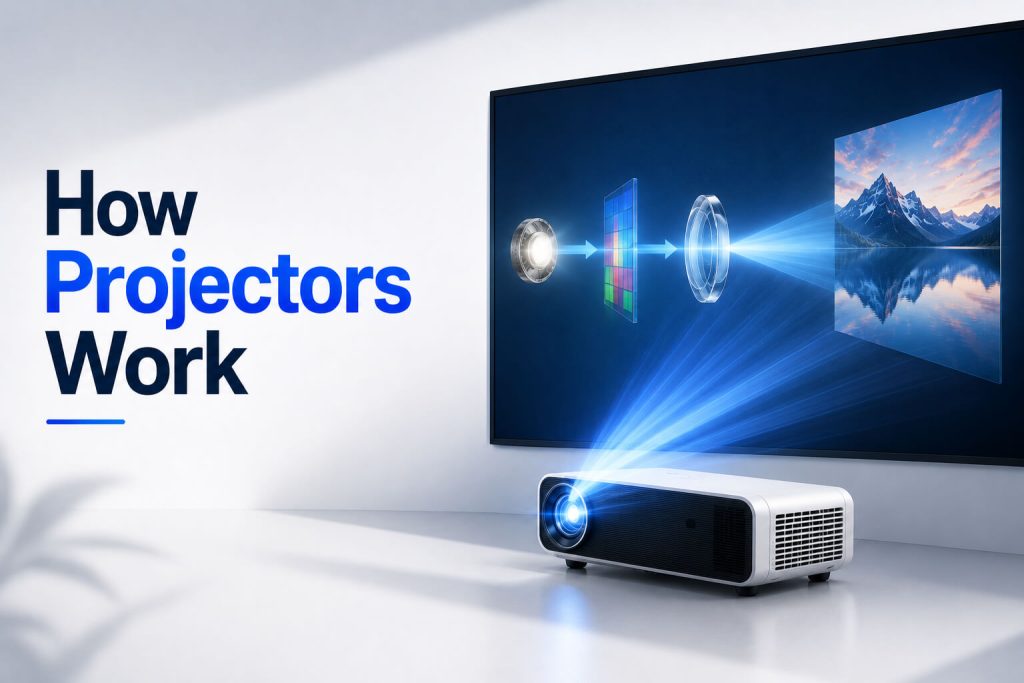
Projectors and display technology have transformed the way we watch movies, deliver presentations, and enjoy large-screen entertainment. Understanding how modern projector technologies work will help you choose the right projector for your needs.
Today’s market offers several projector technologies—including LCD, DLP, LED, and Laser—each designed for different environments and user needs. Understanding their strengths, limitations, and key specifications makes comparing models much easier.
Quick Answer
Projectors are display devices that create large images by projecting light through an optical system onto a screen or flat surface. Modern display technology includes LCD, DLP, LED, and Laser projection systems, each using different methods to generate images while balancing brightness, color accuracy, energy efficiency, and image quality.
In this guide, you’ll learn how projector technology has evolved, the different types of projectors available today, the core display technologies behind them, and the key features you should understand before choosing one.
What Is Display Technology?
Display technology refers to the methods and hardware used to create visual images that people can see on screens or projection surfaces.
From smartphones and televisions to computer monitors and projectors, every display device relies on specific technologies to reproduce images using light, color, and electronic processing.
Unlike televisions, which generate images directly on their built-in screens, projectors produce an image by directing light through an optical system and projecting it onto an external surface.
As display technology continues to improve, modern projectors now deliver:
- Higher image quality
- Better color accuracy
- Improved energy efficiency
- Longer light source lifespan
- Smarter wireless connectivity
- More compact designs
These improvements have made projectors practical not only for professional presentations but also for everyday home entertainment.
What Is a Projector and How Does It Work?
A projector is an electronic display device that enlarges digital images or videos and projects them onto a screen, wall, or other flat surface.
Instead of viewing content on a relatively small television or monitor, a projector allows users to create much larger viewing experiences—often exceeding 100 inches.
Projectors are commonly used for:
- Home theater systems
- Business presentations
- Classrooms and education
- Gaming
- Outdoor movie nights
- Conferences
- Digital signage
- Portable entertainment
Modern projectors can connect to a variety of devices, including laptops, smartphones, tablets, gaming consoles, streaming devices, and Blu-ray players.
Some smart projectors even include built-in operating systems, allowing users to stream content directly without requiring additional hardware.
Why Are Projectors Becoming More Popular?
Projectors have become increasingly popular because advances in display technology have made them brighter, smaller, quieter, and more affordable than ever before.
Several factors contribute to their growing popularity:
Large Screen Experience
One of the biggest advantages of a projector is its ability to create an immersive viewing experience.
Even compact projectors can produce screen sizes far larger than most televisions.
Improved Image Quality
Modern display technologies now support:
- Full HD (1080p)
- 4K Ultra HD
- HDR compatibility
- Better color reproduction
- Higher contrast ratios
This makes projectors suitable for movies, sports, gaming, and business presentations.
Better Portability
Portable and mini projectors allow users to carry large-screen entertainment almost anywhere.
Many models are lightweight, rechargeable, and support wireless casting from smartphones.
Want to learn more about compact portable projectors? Read our complete guide on What Is a Mini Projector.
Wireless Connectivity
Many modern projectors include features such as:
- Wi-Fi
- Bluetooth
- Screen Mirroring
- Chromecast compatibility
- AirPlay support
- Android TV integration
These features reduce cable clutter and simplify device connectivity.
The Evolution of Projector Technology
Projector technology has changed dramatically over the past several decades.
Earlier projectors were large, expensive, and mainly designed for conference rooms or educational institutions.
Today’s projectors are significantly more advanced thanks to improvements in display engineering and digital imaging.
Some major milestones include:
- CRT projectors (early generation)
- LCD projectors
- DLP projectors
- LED projectors
- Laser projectors
- Smart projectors
- Ultra Short Throw (UST) projectors
Each generation has improved image quality, brightness, efficiency, portability, and ease of use.
Main Types of Modern Projectors
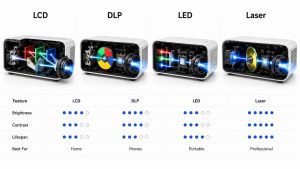
Modern projectors generally fall into four major technology categories.
LCD Projectors
LCD (Liquid Crystal Display) projectors produce images by passing light through liquid crystal panels.
They are known for:
- Excellent color accuracy
- Bright images
- Sharp text
- Affordable pricing
LCD projectors are commonly used in classrooms, offices, and home entertainment.
DLP Projectors
DLP (Digital Light Processing) projectors use microscopic mirrors on a digital micromirror device (DMD) to reflect light and create images.
Their advantages include:
- Smooth motion
- High contrast
- Compact design
- Reliable long-term performance
These projectors are popular for movies, gaming, and business presentations.
LED Projectors
LED projectors use light-emitting diodes instead of traditional projector lamps.
Benefits include:
- Lower power consumption
- Longer light source lifespan
- Compact size
- Reduced heat generation
LED technology is especially common in portable and mini projectors.
Laser Projectors
Laser projectors use laser light sources instead of conventional lamps.
They offer:
- Exceptional brightness
- Excellent colour performance
- Long operating life
- Minimal maintenance
- Fast start-up times
Laser projectors are increasingly used in premium home theatres, educational institutions, and commercial environments.
How Do Projectors Work? (Overview)
Although different projector technologies use different image-generation methods, the basic working principle is similar.
A projector receives a video signal from a connected device, processes the digital image, generates light using its internal light source, and passes that light through an imaging system before projecting it through a precision lens onto a screen.
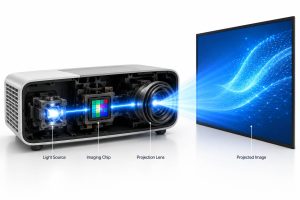
The process generally involves these stages:
- The projector receives an image or video signal.
- An image processor prepares the visual data.
- The light source produces bright illumination.
- The display technology (LCD, DLP, or Laser) creates the image.
- The projection lens enlarges and focuses the image onto the screen.
This entire process happens almost instantly, allowing projectors to display smooth videos, presentations, and games.
Want a deeper technical explanation? Read our complete guide on How Projector Works, where we explain LCD, DLP, LED, Laser, optical engines, colour wheels, and image processing in detail.
The Key Components Inside a Modern Projector
Every projector contains several essential components that work together to create a large, clear image.
Light Source
The light source is responsible for producing the brightness needed for image projection.
Modern projectors typically use one of these technologies:
- Traditional projection lamps
- LED light sources
- Laser light sources
Each option offers different advantages in brightness, lifespan, maintenance, and energy efficiency.
Image Processing Engine
The image processor receives digital video signals and prepares them for projection.
It handles tasks such as:
- Image scaling
- Color processing
- Motion handling
- Video decoding
- Resolution optimization
A high-quality image processor contributes to smoother visuals and improved picture quality.
Display Chip or Imaging System
The imaging system is where the actual picture is created.
Depending on the projector, this may involve:
- LCD panels
- DLP digital micromirror devices (DMD)
- Laser-based imaging systems
Each technology has unique strengths in color accuracy, contrast, and motion performance.
Projection Lens
The projection lens enlarges and focuses the generated image onto the screen.
Lens quality directly affects:
- Image sharpness
- Focus consistency
- Screen size
- Projection distance
Premium projectors often include higher-quality lenses that deliver clearer images across the entire screen.
Understanding Projector Resolution
Resolution refers to the number of pixels used to create an image.
Higher resolutions generally produce sharper pictures with greater detail.
Common projector resolutions include:
- HD (720p)
- Full HD (1080p)
- 2K
- 4K Ultra HD
The ideal resolution depends on your intended use.
For presentations, Full HD is often sufficient, while home theater enthusiasts and gamers may prefer 4K models for enhanced detail.
What Is Brightness (Lumens)?
Brightness measures how much light a projector produces.
It is typically expressed in lumens or, for some manufacturers, ANSI lumens, which provide a standardized measurement.
Higher brightness levels are generally better for:
- Bright rooms
- Classrooms
- Offices
- Outdoor viewing
Lower-brightness projectors are often suitable for dark home theater environments where ambient light is minimal.
When comparing models, always check whether the brightness specification uses ANSI lumens for a more consistent comparison.
Why Contrast Ratio Matters
Contrast ratio describes the difference between the darkest black and the brightest white a projector can display.
A higher contrast ratio usually results in:
- Better shadow detail
- Richer blacks
- Greater image depth
- Improved overall picture quality
Contrast becomes particularly important when watching movies, playing games, or viewing high-quality video content.
Understanding Throw Ratio and Projection Distance
Throw ratio determines how large an image a projector can produce from a specific distance.
Projectors generally fall into three categories:
Standard Throw
Designed for typical rooms where the projector is placed several feet from the screen.
Short Throw
Can produce large images from a much shorter distance, making them ideal for classrooms and smaller living spaces.
Ultra Short Throw (UST)
Ultra Short Throw projectors sit very close to the projection surface while still producing extremely large images.
They are increasingly popular for home theaters because they reduce shadows and require minimal installation space.
What Is Keystone Correction?
Keystone correction helps correct image distortion when a projector is not perfectly aligned with the projection screen.
Instead of displaying a rectangular image, an improperly positioned projector may produce a trapezoid-shaped picture.
Keystone correction digitally adjusts the image to restore a more rectangular shape.
Many modern projectors include:
- Vertical keystone correction
- Horizontal keystone correction
- Automatic keystone adjustment
These features make projector setup much easier, especially for portable and mini projectors.
Where Are Projectors Commonly Used?
Thanks to improvements in display technology, projectors are now used in a wide variety of environments.
Some common applications include:
- Home theaters
- Business presentations
- Schools and universities
- Conference rooms
- Outdoor movie nights
- Gaming setups
- Houses of worship
- Digital signage
- Training centers
Portable and mini projectors have also become popular for travel and casual entertainment because they are compact, lightweight, and easy to transport.
If you’re interested in portable models, our What Is a Mini Projector guide explains their features, advantages, and ideal use cases.
How to Choose the Right Projector
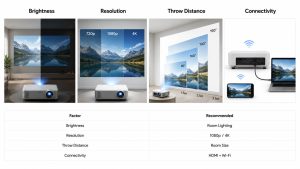
Choosing the right projector depends on more than just price. The best model for you should match your intended use, viewing environment, and preferred features.
Before making a purchase, consider the following factors.
Purpose of Use
Start by identifying how you plan to use the projector.
Different models are optimized for different scenarios, including:
- Home theater and movies
- Business presentations
- Classroom teaching
- Gaming
- Outdoor entertainment
- Portable travel use
Selecting a projector designed for your primary purpose usually provides the best experience.
Resolution
Higher resolutions produce sharper images.
General recommendations include:
- HD (720p) for basic viewing
- Full HD (1080p) for most users
- 4K Ultra HD for premium home theatres and high-detail gaming
Choose a resolution that matches both your content and your budget.
Brightness
Brightness should match the lighting conditions of your viewing environment.
- Dark rooms generally require less brightness.
- Bright rooms benefit from higher ANSI lumens for clearer images.
If you frequently use a projector during the day, brightness becomes one of the most important specifications.
Connectivity
Modern projectors support a wide range of connection options.
Common interfaces include:
- HDMI
- USB
- USB-C
- Wi-Fi
- Bluetooth
- Screen Mirroring
- Chromecast
- AirPlays
The right connectivity options make it easier to connect laptops, smartphones, gaming consoles, and streaming devices.
If you want to connect a projector to your smartphone, read our step-by-step guide on How to Connect Mini Projector to Phone.
Portability
If you travel frequently or move your projector between rooms, consider:
- Weight
- Size
- Built-in battery
- Carrying case compatibility
Mini projectors are often the best choice for users who prioritize portability. Our What Is a Mini Projector guide explains when a compact projector is the better choice.
The Future of Projector and Display Technology
Projector technology continues to evolve rapidly as manufacturers improve image quality, portability, and smart features.
Several trends are shaping the future of projection systems.
Laser Light Sources
Laser projectors are becoming increasingly popular because they offer:
- Longer lifespan
- Consistent brightness
- Faster start-up
- Lower maintenance
They are expected to replace traditional projector lamps in many applications.
Smarter Projectors
Modern projectors increasingly include:
- Android TV
- Google TV
- Built-in streaming apps
- Voice assistants
- Wireless software updates
These features reduce the need for external streaming devices.
AI-Powered Image Optimization
Many newer projectors use artificial intelligence to automatically adjust:
- Focus
- Keystone correction
- Brightness
- Colour balance
- Screen alignment
This simplifies setup and improves image quality with minimal user effort.
Better Portable Projectors
Mini projectors continue to improve with:
- Higher brightness
- Better battery life
- Full HD and 4K support
- Faster wireless connectivity
- Improved speakers
As technology advances, portable projectors are becoming practical for both entertainment and professional use.

Frequently Asked Questions (FAQs)
What is the best projector technology?
There is no single best technology for everyone.
- LCD projectors often provide excellent color accuracy.
- DLP projectors are known for smooth motion and strong contrast.
- LED projectors offer long-lasting, energy-efficient light sources.
- Laser projectors deliver premium brightness and minimal maintenance.
The best choice depends on your budget, environment, and intended use.
Are projectors better than TVs?
Projectors and TVs serve different purposes.
Projectors are ideal for creating large, cinematic viewing experiences, while televisions generally offer higher brightness and simpler installation for everyday use.
Can I use a projector without a screen?
Yes.
Many projectors can display images on a clean, light-coloured wall.
However, a dedicated projection screen usually provides better brightness, contrast, and colour accuracy.
Are mini projectors worth buying?
Mini projectors are an excellent choice for portability, travel, and casual entertainment.
However, full-size projectors generally provide higher brightness and better overall image quality.
Read our comparison guide to learn which option best suits your needs.
How long do modern projectors last?
The lifespan varies depending on the light source.
Traditional lamp projectors generally require lamp replacement sooner than LED and laser models, while LED and laser light sources are designed for much longer operational life under normal use.
Conclusion
Projectors have become far more capable than they were just a decade ago. Thanks to advances in display technology, users now have access to brighter images, sharper resolutions, smarter connectivity, and a wide variety of projector types designed for different needs.
Whether you’re building a home theatre, preparing business presentations, teaching in a classroom, or enjoying portable entertainment, understanding projector technology helps you choose the right device with confidence.
By learning the differences between LCD, DLP, LED, and Laser projectors—as well as key specifications like resolution, brightness, contrast ratio, and throw ratio—you’ll be better equipped to invest in a projector that delivers excellent long-term value.
As display technology continues to evolve, projectors are becoming smarter, more efficient, and more accessible than ever, making them an increasingly attractive choice for both personal and professional use.