
Introduction
Modern projectors can display massive, high-quality images from a surprisingly compact device. Whether you’re watching a movie, giving a business presentation, teaching in a classroom, or gaming on a large screen, the technology inside a projector works continuously to convert digital signals into bright, detailed images.
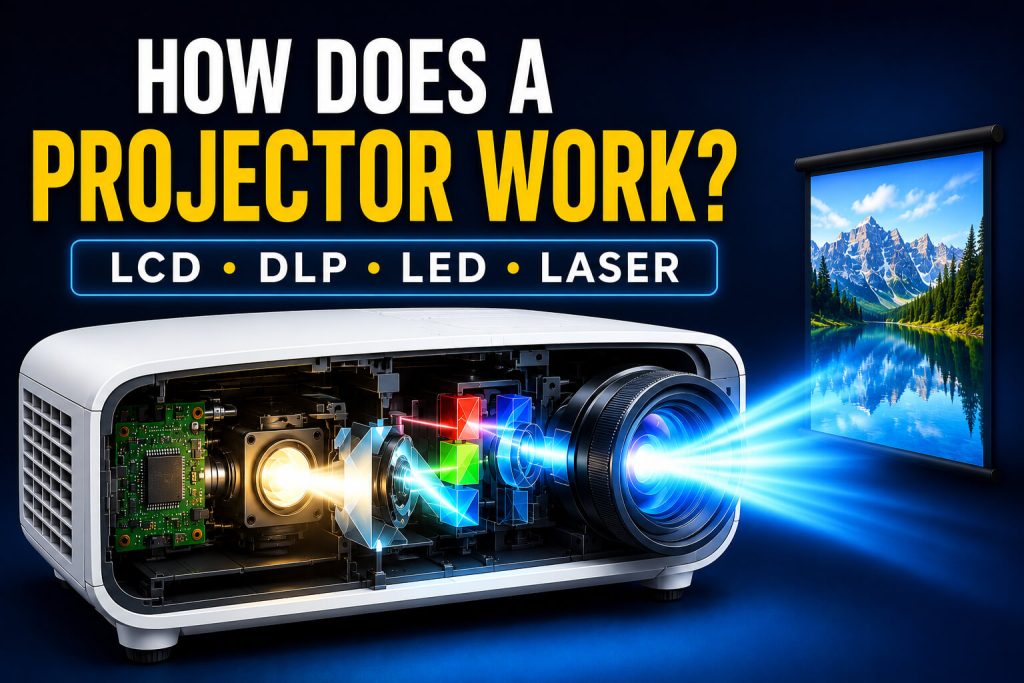
Although projectors may appear simple from the outside, they combine advanced optics, powerful light sources, digital image processing, and precision projection systems to create large, clear visuals.
Different projector technologies—such as LCD, DLP, LED, and Laser—use different methods to generate images, but they all follow the same basic projection principle.
Understanding how a projector works not only helps you appreciate the technology but also makes it easier to compare projector types and choose the right model for your needs.
Quick Answer
A projector works by receiving a digital image signal, processing it internally, generating light through a powerful light source, creating an image using a display technology such as LCD or DLP, and projecting that image through a precision lens onto a screen. While LCD, DLP, LED, and Laser projectors use different imaging technologies, they all follow this same fundamental projection process.
If you’re looking for a complete overview of projector types, display technologies, brightness, resolution, and buying considerations, read our Projectors and Display Technology guide before diving into the technical details.
The Basic Working Principle of a Projector
Every modern projector follows a sequence of carefully coordinated steps to display an image.
Although the internal technology may vary, the overall process remains remarkably similar.
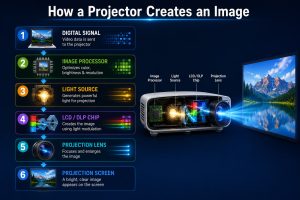
The basic workflow looks like this:
- A connected device sends a digital video signal.
- The projector receives and processes the signal.
- The internal light source produces bright illumination.
- The imaging system converts the signal into a visual image.
- The projection lens enlarges and focuses the image.
- The image appears on the projection screen.
All of these steps happen in real time, allowing projectors to display movies, presentations, games, and videos with smooth motion and accurate colors.
What Happens Inside a Projector?
Many users think a projector simply shines light onto a wall, but the process is much more sophisticated.
Inside the projector, multiple electronic and optical components work together to transform digital information into a large projected image.
The main internal systems include:
- Video input system
- Image processor
- Light source
- Optical engine
- Display chip (LCD or DLP)
- Projection lens
- Cooling system
Each component plays a specific role, and even a small problem with one of these systems can affect image quality.
Step 1: Receiving the Digital Signal
The projection process begins when a source device sends visual information to the projector.
Common source devices include:
- Laptop computers
- Desktop PCs
- Smartphones
- Tablets
- Gaming consoles
- Streaming devices
- Blu-ray players
The signal is usually transmitted through:
- HDMI
- USB-C (DisplayPort Alt Mode)
- VGA (older systems)
- Wi-Fi
- Screen Mirroring
- Chromecast
- AirPlay
Once the signal reaches the projector, the internal electronics prepare it for image processing.
Step 2: Image Processing
Before the image can be projected, the projector’s image processor analyses and optimizes the incoming video signal.
This processing stage performs several important tasks, including:
- Decoding video data
- Scaling the image to the projector’s native resolution
- Adjusting brightness and contrast
- Improving color accuracy
- Synchronizing frame timing
- Reducing digital noise
Modern projectors use increasingly powerful processors that can improve image quality in real time, especially when displaying high-resolution or fast-moving content.
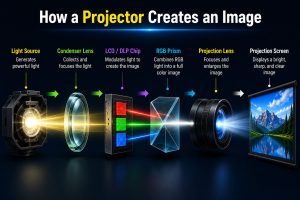
Step 3: The Light Source Produces Bright Illumination
Without light, a projector cannot create an image.
The light source generates the illumination needed for the optical system to project visuals onto a screen.
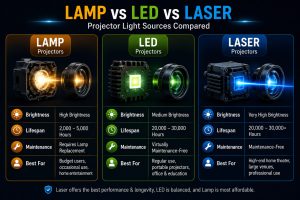
Modern projectors typically use one of the following light sources:
H3
Traditional Projection Lamp
Conventional projector lamps produce intense brightness but generally require replacement after several thousand hours of use.
They remain common in many business and educational projectors.
LED Light Source
LED projectors use light-emitting diodes instead of traditional lamps.
Advantages include:
- Lower power consumption
- Longer operational lifespan
- Reduced heat generation
- Compact design
LED technology is widely used in portable and mini projectors.
If you’re interested in compact projection devices, our What Is a Mini Projector guide explains how mini projectors differ from traditional models.
Laser Light Source
Laser projectors use laser-based illumination to produce bright, consistent images.
Their key benefits include:
- Higher brightness
- Excellent color performance
- Longer lifespan
- Minimal maintenance
- Fast startup
Laser technology has become increasingly popular in premium home theaters and professional installations.
Why the Optical Engine Is So Important
The optical engine is often considered the heart of a projector.
It combines the light source, mirrors, filters, lenses, and imaging components to produce the final projected image.
Its responsibilities include:
- Directing light efficiently
- Maintaining color accuracy
- Improving brightness
- Reducing light loss
- Delivering sharp images across the screen
The quality of the optical engine has a significant impact on overall projector performance, especially in terms of image clarity and color reproduction.

How LCD Projectors Work
LCD (Liquid Crystal Display) projectors create images by passing light through liquid crystal panels.
The process begins when the projector’s light source produces bright white light. This light is then separated into the three primary colors:
- Red
- Green
- Blue
Each color passes through its own LCD panel.
The liquid crystals inside each panel act like tiny shutters, controlling how much light passes through every individual pixel.
Afterward, the three colored images are combined inside a special optical prism before passing through the projection lens.
The final result is a bright, colorful image displayed on the projection screen.
Advantages of LCD Technology
- Excellent color accuracy
- Bright images
- Sharp text and graphics
- Ideal for classrooms and presentations
How DLP Projectors Work
DLP stands for Digital Light Processing.
Instead of using LCD panels, DLP projectors rely on a tiny semiconductor called a Digital Micromirror Device (DMD).
A DMD chip contains hundreds of thousands—or even millions—of microscopic mirrors.
Each mirror represents one pixel.
These mirrors rapidly tilt toward or away from the projection lens thousands of times every second.
As they move, they control how much light reaches each pixel, creating the image.
Single-chip DLP projectors also use a rapidly spinning color wheel that produces red, green, and blue light sequentially.
Your eyes combine these rapidly changing colors into a full-color image.
Advantages of DLP Technology
- Smooth motion
- High contrast
- Compact optical design
- Excellent performance for movies and gaming
How LED Projectors Work
Many people think LED projectors use a different image-generation technology.
In reality, LED refers to the light source, not the imaging system.
An LED projector may still use LCD or DLP technology to create the image.
The difference is that traditional projector lamps are replaced with long-lasting LEDs.
LED light sources provide several advantages:
- Lower energy consumption
- Longer operating life
- Reduced heat generation
- Quieter operation
- Compact projector designs
This is one reason LED technology is commonly found in portable and mini projectors.
Our What Is a Mini Projector guide explains why LED light sources are widely used in compact projectors.
How Laser Projectors Work
Laser projectors also differ mainly in their light source.
Instead of using lamps or LEDs, they generate illumination using laser light.
The laser light passes through the projector’s optical engine and imaging system before being projected through the lens.
Laser illumination offers several important benefits:
- Higher brightness
- Stable color performance
- Longer operational lifespan
- Faster startup
- Lower maintenance requirements
Because laser light remains more consistent over time, many premium projectors maintain image quality for years with minimal brightness degradation.
The Role of the Projection Lens
After the image has been created by the imaging system, it still needs to be enlarged and focused.
This is the job of the projection lens.
The lens performs several important functions:
- Magnifies the image
- Focuses image sharpness
- Controls projection distance
- Determines screen size
Higher-quality lenses generally produce:
- Better edge-to-edge sharpness
- Less image distortion
- Improved brightness consistency
- Better overall picture quality
How the Complete Projection Process Works
Although LCD, DLP, LED, and Laser projectors use different technologies internally, the overall projection process follows a similar sequence.
Step-by-Step Workflow
- A laptop, smartphone, console, or streaming device sends a digital video signal.
- The projector receives the signal.
- The image processor analyzes and optimizes the video.
- The light source generates bright illumination.
- The imaging system creates the visual image.
- The optical engine directs the light accurately.
- The projection lens enlarges and focuses the image.
- A bright, clear picture appears on the screen.
This entire workflow happens continuously while the projector is operating, allowing smooth playback of videos, games, presentations, and live content.
Why Different Projector Technologies Produce Different Image Quality
No projector technology is perfect for every situation.
Image quality depends on multiple factors, including:
- Light source quality
- Imaging technology
- Optical engine design
- Lens quality
- Native resolution
- Brightness (ANSI lumens)
- Contrast ratio
- Image processing capabilities
For example:
- LCD projectors often deliver vibrant colors.
- DLP projectors typically provide smoother motion and stronger contrast.
- LED projectors emphasize efficiency and portability.
- Laser projectors excel in brightness, longevity, and premium image quality.
Understanding these differences makes it easier to choose a projector that matches your specific needs rather than relying on specifications alone.
For a broader comparison of projector technologies, buying factors, and display features, read our complete Projectors and Display Technology guide.
Common Myths About How Projectors Work
Projector technology has improved significantly over the years, but several misconceptions still exist. Understanding the facts can help you make better buying decisions and use your projector more effectively.
Myth 1: A Projector Simply Shines Light on a Wall
Fact:
A projector does much more than produce light.
Inside every modern projector, the incoming digital signal is processed, converted into an image by an imaging system, and then projected through a precision optical engine and lens.
Without these components, a projector cannot create a sharp, accurate picture.
Myth 2: All Projectors Work the Same Way
Fact:
Although every projector follows the same basic projection principle, LCD, DLP, LED, and Laser projectors generate images using different technologies.
Each technology offers different strengths in image quality, brightness, color reproduction, motion handling, maintenance, and energy efficiency.
Myth 3: LED Is Better Than LCD
Fact:
This comparison is often misleading because LED and LCD describe different parts of a projector.
LED refers to the light source, while LCD refers to the imaging technology.
An LED projector may actually use LCD or DLP technology internally.
Myth 4: More Lumens Always Mean Better Image Quality
Fact:
Higher brightness is useful, especially in well-lit rooms, but image quality also depends on:
- Native resolution
- Contrast ratio
- Color accuracy
- Lens quality
- Image processing
- Display technology
A well-balanced projector often provides a better viewing experience than one with extremely high brightness alone.
Frequently Asked Questions (FAQs)
How does a projector create an image?
A projector receives a digital video signal, processes it internally, generates light through its light source, creates an image using an imaging system such as LCD or DLP, and projects that image through a lens onto a screen.
What is the difference between LCD and DLP projectors?
LCD projectors use liquid crystal panels to create images, while DLP projectors use millions of microscopic mirrors on a Digital Micromirror Device (DMD) chip.
LCD technology is often known for vibrant colors, whereas DLP technology is widely appreciated for smooth motion and strong contrast.
Do LED projectors use different projection technology?
Not necessarily.
Most LED projectors still use LCD or DLP imaging systems.
The term “LED projector” simply indicates that LEDs are used as the light source instead of a traditional lamp.
Why do projectors need cooling systems?
Projectors generate heat during operation.
Cooling fans and heat management systems help protect internal components, maintain image quality, and extend the lifespan of the projector.
Does projector technology affect picture quality?
Yes.
Image quality is influenced by the projector’s display technology, light source, optical engine, lens quality, native resolution, brightness, and contrast ratio.
Each component contributes to the final viewing experience.
Conclusion
Modern projectors are sophisticated display devices that combine optics, electronics, and digital image processing to produce large, high-quality visuals.
Although LCD, DLP, LED, and Laser projectors use different methods to generate images, they all follow the same core process: receiving a digital signal, processing the image, generating light, creating the picture through an imaging system, and projecting it through a precision lens.
Understanding how a projector works helps you compare technologies more effectively, interpret technical specifications with confidence, and choose a projector that best fits your viewing environment and intended use.
Whether you’re setting up a home theater, delivering presentations, or enjoying portable entertainment, knowing the technology behind projection systems allows you to make more informed purchasing and setup decisions.