

Introduction
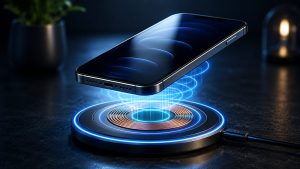
How wireless charging works is easier to understand than many people think. Wireless charging has become one of the most convenient ways to charge smartphones, smartwatches, and wireless earbuds. Instead of plugging in a charging cable, users simply place a compatible device on a charging pad, and the battery begins charging automatically.
Although the process appears almost magical, the technology behind wireless charging is based on well-established scientific principles. Every wireless charger uses electromagnetic energy to transfer power from the charging pad to a compatible device without requiring a physical cable.
As more smartphones, earbuds, and wearable devices support wireless charging, many people want to understand exactly how it works, whether it is safe, and how it differs from traditional wired charging.
If you’re new to this topic, you may also want to read our complete guide on Wireless Charging Technology, which explains the different types of wireless charging systems, their advantages, limitations, and future developments.
In this guide, you’ll learn the complete charging process step by step, understand the role of charging coils, discover how Qi wireless charging works, and learn why proper alignment is important for efficient charging.
What Is Wireless Charging?
Before understanding how wireless charging works, it’s important to understand what wireless charging actually is.
Wireless charging is a method of transferring electrical energy from a charger to a compatible electronic device without using a charging cable.
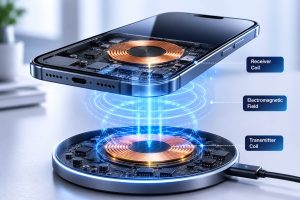
Instead of electricity flowing through metal connectors, power is transferred through an electromagnetic field created between two coils.
One coil is located inside the charging pad, while another coil is built into the smartphone or other compatible device.
When both coils are correctly aligned, energy flows from the charger to the battery.
If you’d like a detailed explanation of the basic concept, read our dedicated guide on What Is Wireless Charging.
The Science Behind Wireless Charging
Wireless charging is based on a scientific principle known as electromagnetic induction.
This principle was discovered by the British scientist Michael Faraday in the 19th century.
Electromagnetic induction states that a changing magnetic field can generate an electric current inside another nearby conductor.
Modern wireless chargers use this principle to transfer electrical energy safely over a very short distance.
Although users simply place a phone on a charging pad, several complex processes occur simultaneously inside both the charger and the smartphone.
Step-by-Step: How Wireless Charging Works
Understanding the charging process becomes much easier when it is divided into individual steps.
Step 1: The Wireless Charger Receives Electricity
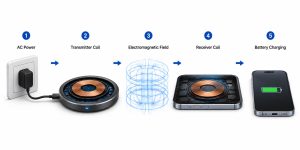
The process begins when the wireless charging pad is connected to a wall adapter.
Electricity from the power outlet enters the charging pad through a cable.
Inside the charger, electronic circuits regulate the incoming electricity and prepare it for wireless transmission.
At this stage, no energy is transferred to the phone yet because the charger first waits for a compatible device to be placed on its surface.
Step 2: The Transmitter Coil Generates a Magnetic Field
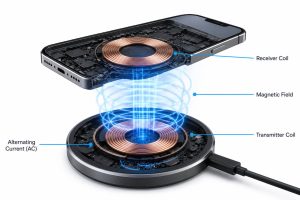
Inside every wireless charging pad is a copper coil called the transmitter coil.
When alternating current flows through this coil, it creates an alternating magnetic field above the surface of the charger.
This magnetic field contains the energy that will eventually charge your smartphone.
Unlike traditional charging, no metal connectors are required during this process.
The magnetic field exists only over a very short distance, which is why your phone must be placed directly on the charging pad.
Step 3: The Receiver Coil Captures the Magnetic Energy
Compatible smartphones contain another copper coil known as the receiver coil.
Once the phone is placed on the charging pad, the receiver coil enters the magnetic field produced by the transmitter coil.
The magnetic field induces an electric current inside the receiver coil.
This electrical current is then transferred to the phone’s battery management system.
At this point, wireless energy has successfully become electrical energy again.
The phone now begins charging just like it would with a traditional charging cable.
Step 4: The Battery Management System Regulates the Power
After the receiver coil converts the magnetic energy into electrical current, the electricity is not sent directly to the battery. Instead, it first passes through the phone’s Battery Management System (BMS).
The BMS is responsible for controlling how much power reaches the battery. It constantly monitors voltage, current, and temperature to ensure the battery charges safely.
Modern smartphones automatically adjust the charging speed depending on several factors, including battery level, temperature, and charger compatibility.
For example, if your phone becomes too warm during charging, the Battery Management System may reduce the charging speed to prevent overheating and protect battery health.
This intelligent power management helps extend battery lifespan while maintaining safe charging conditions.
Step 5: Communication Between the Charger and Your Device
One feature many people don’t realize is that wireless chargers and smartphones actually communicate with each other.
Before full power is transferred, the charger checks whether the device supports wireless charging and determines the maximum charging speed it can safely deliver.
If the charger detects an incompatible object, such as keys, coins, or other metal items, it will usually stop transferring power.
This safety feature is known as Foreign Object Detection (FOD).
It helps prevent unnecessary heat generation and improves overall charging safety.
Modern Qi-certified chargers also adjust power automatically based on the device being charged.
If you’d like to learn more about how devices communicate during charging, read our detailed guide on How Qi Wireless Charging Works.
Step 6: The Charging Process Ends Automatically
Once the battery approaches full capacity, the phone gradually reduces the charging speed.
When the battery reaches 100%, the charger either stops supplying power or switches to a very low maintenance mode.
This automatic process helps protect the battery from overcharging.
Contrary to a common myth, modern wireless chargers do not continuously force electricity into a fully charged battery.
Instead, they work together with the phone’s Battery Management System to maintain battery health.
Why Proper Alignment Matters
One of the biggest differences between wired and wireless charging is the importance of correct alignment.
The transmitter coil inside the charger and the receiver coil inside the phone must be positioned close to each other.
If the coils are not properly aligned, several problems may occur:
- Slower charging speed
- Charging interruptions
- Excess heat generation
- Lower charging efficiency
- Higher energy loss
Many premium wireless chargers include alignment magnets or positioning guides to help users place their phones correctly.
Some smartphones also display an on-screen charging animation that confirms proper alignment.
What Determines Wireless Charging Speed?
Not every wireless charger delivers the same charging performance.
Several factors affect charging speed.
Charger Output
A higher-wattage charger generally provides faster charging if the phone also supports that charging speed.
For example:
- 5W Wireless Charger
- 7.5W Wireless Charger
- 10W Wireless Charger
- 15W Wireless Charger
However, the phone will only charge at the maximum speed it supports.
Device Compatibility
Older smartphones often support lower wireless charging speeds than newer models.
Using a high-powered charger with an older device does not necessarily increase charging speed.
Phone Case Thickness
Very thick protective cases, especially those containing metal components or magnets that are not designed for wireless charging, can reduce charging efficiency.
Removing the case may improve charging performance.
Heat
Heat is one of the biggest factors affecting charging speed.
If either the charger or the smartphone becomes too hot, charging speed is automatically reduced to protect the battery.
This is a normal safety feature found in most modern devices.
Why Wireless Charging Generates Heat
Many users notice that their phones become warm during wireless charging.
This happens because no energy transfer system is 100% efficient.
Some energy is naturally lost as heat during electromagnetic induction.
Manufacturers reduce this heat using:
- Better coil design
- Improved cooling systems
- Intelligent charging software
- Temperature sensors
- Adaptive charging technology
Although slight warmth is normal, excessive heat may indicate poor alignment or the use of a low-quality charger.
Is Wireless Charging Efficient?
Wireless charging has become much more efficient than it was a decade ago.
Modern Qi-certified chargers can achieve high energy transfer efficiency under ideal conditions.
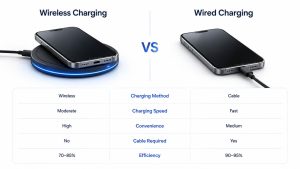
However, wired charging is still generally more energy-efficient because electricity travels directly through a cable instead of being transferred through a magnetic field.
For most everyday users, the small difference in efficiency is outweighed by the convenience of cable-free charging.
If you’re wondering which method is better for everyday use, read our comparison guide on Wireless Charging vs Wired Charging.
Advantages of Wireless Charging
Wireless charging has become popular because it offers several practical benefits for everyday users.
More Convenient Charging
Instead of plugging in a cable every time, you simply place your phone on a charging pad. This makes charging faster and more convenient, especially at night or while working at a desk.
Less Wear on Charging Ports
Frequent plugging and unplugging can wear out a phone’s charging port over time. Wireless charging reduces this physical wear because no cable needs to be inserted into the device.
Cleaner Workspace
Wireless chargers help reduce cable clutter on desks, bedside tables, and office setups, creating a cleaner and more organized workspace.
Universal Compatibility
Many Qi-certified chargers can charge devices from different manufacturers, making them convenient for households with multiple brands of smartphones and accessories.
Common Wireless Charging Problems
Although wireless charging is convenient, users may occasionally face a few common issues.
Phone Charges Slowly
Possible causes include:
- Using a low-power charger
- Thick phone cases
- Poor coil alignment
- High device temperature
- Background apps consuming power
Haring Stops Randomly
This may happen if the phone moves slightly on the charging pad or if the charger detects a foreign object.
Phone Gets Warm
Slight warmth is normal during wireless charging. However, excessive heat may indicate poor alignment or the use of a low-quality charger.
Tips for Faster Wireless Charging
- Use a Qi-certified charger.
- Use the charger with its recommended wall adapter.
- Remove very thick or metal cases.
- Centre the phone on the charging pad.
- Keep the charger in a cool, well-ventilated area.
- Close unnecessary apps while charging.
Is Wireless Charging Safe?
Yes, wireless charging is generally safe when using certified chargers and compatible devices.
Modern wireless chargers include safety features such as:
- Overcharge protection
- Temperature monitoring
- Foreign object detection
- Voltage regulation
- Short-circuit protection
- Automatic power adjustment
These features help protect both the charger and the device during the charging process.
Frequently Asked Questions (FAQs)
Does wireless charging damage the battery?
No. Using a high-quality, certified charger will not normally damage your battery.
(Internal Link → Does Wireless Charging Damage Battery)
Can I use any wireless charger with my phone?
You can use most Qi-certified chargers with Qi-compatible smartphones.
Is wireless charging slower than wired charging?
In many cases, yes. Wired charging is generally faster, especially with modern fast-charging technologies.
Can I leave my phone on a wireless charger overnight?
Yes. Modern smartphones automatically manage charging and stop drawing significant power when the battery is full.
Why does my phone get warm while charging wirelessly?
Some energy is naturally lost as heat during electromagnetic induction, so slight warmth is normal.
Conclusion
Wireless charging works by transferring energy through a magnetic field using a principle called electromagnetic induction. A transmitter coil inside the charging pad creates a magnetic field, and a receiver coil inside the phone converts that magnetic energy back into electrical power to charge the battery.
Modern wireless charging systems are safer, faster, and more efficient than ever before. Although wired charging is still generally faster, wireless charging offers unmatched convenience, reduced cable clutter, and less wear on charging ports.
As technologies such as Qi charging continue to improve, wireless charging is expected to become an even more important part of everyday consumer electronics.