
Introduction
Bluetooth earbuds have become an essential accessory for music lovers, remote workers, fitness enthusiasts, and travelers. With just a few taps, they can connect to your smartphone, tablet, laptop, or smartwatch without the need for tangled cables. But have you ever wondered how Bluetooth earbuds connect so quickly and reliably?
Behind this simple process is a combination of Bluetooth technology, wireless radio signals, secure pairing protocols, and intelligent software. Once connected, your earbuds can stream music, handle phone calls, activate voice assistants, and even switch between multiple devices seamlessly.
In this guide, you’ll learn how Bluetooth earbuds connect, how wireless earbuds work, how do earbud headphones work, how earbud microphones work, and how noise cancelling earbuds work. Whether you’re using Bluetooth earbuds for the first time or want to understand the technology better, this article explains everything in simple language.
What Are Bluetooth Earbuds?
Bluetooth earbuds are wireless audio devices that use Bluetooth technology to communicate with smartphones, tablets, laptops, smart TVs, gaming consoles, and other compatible devices.
Unlike wired headphones, Bluetooth earbuds don’t require an audio cable. Instead, they transmit digital audio signals wirelessly using radio waves.
Most modern Bluetooth earbuds also include features like:
- Noise cancellation
- Touch controls
- Voice assistant support
- Built-in microphones
- Water resistance
- Fast charging
- Multipoint connectivity
These features make Bluetooth earbuds one of today’s most popular portable audio accessories.
How Bluetooth Earbuds Connect
Understanding how Bluetooth earbuds connect starts with knowing how Bluetooth technology works.
Bluetooth is a short-range wireless communication standard that allows two compatible devices to exchange data securely without using cables.
The connection process generally involves five steps:
1. The Earbuds Enter Pairing Mode
When Bluetooth earbuds are powered on for the first time, they usually enter pairing mode automatically.
If they’ve been connected before, you may need to press and hold the pairing button until the LED light flashes.
This flashing indicator tells nearby devices that the earbuds are ready to connect.
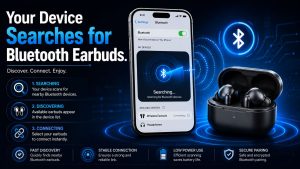
2. Your Device Searches for Bluetooth Earbuds
Next, open the Bluetooth settings on your device.
Examples include:
- Android phones
- iPhones
- Windows laptops
- MacBooks
- Tablets
- Smart TVs
The device scans for nearby Bluetooth accessories.
Within a few seconds, your earbuds appear in the available device list.
3. Pairing the Bluetooth Earbuds
Simply tap the name of your earbuds.
The phone sends a pairing request.
The earbuds verify the request, exchange security information, and establish an encrypted wireless connection.
Once paired, the devices remember each other for future use.
4. Automatic Bluetooth Earbuds Reconnection
One of the best features of modern earbuds is automatic reconnection.
The next time you remove the earbuds from the charging case, they automatically reconnect to the last paired device—as long as Bluetooth is enabled and the device is nearby.
This entire process usually takes only a few seconds.
5. Wireless Audio Transmission
After pairing, your smartphone compresses audio into digital packets.
Bluetooth then transmits those packets wirelessly to the earbuds.
Inside the earbuds, tiny processors decode the digital information into sound, which is played through miniature speakers.
This all happens almost instantly, creating smooth and synchronized audio playback.
Bluetooth Earbuds Pairing Process Explained
The Bluetooth earbuds pairing process is designed to create a secure connection between devices.
During pairing, both devices exchange:
- Device identification
- Security keys
- Bluetooth profiles
- Supported audio codecs
This information helps ensure compatibility and protects your wireless connection from unauthorized access.
Once paired, reconnecting becomes much faster.
Bluetooth Technology Behind Wireless Earbuds
The reason Bluetooth technology in wireless earbuds works so efficiently is because of low-power radio communication.
Bluetooth operates on the 2.4 GHz frequency band, which is available worldwide.
Modern Bluetooth versions provide:
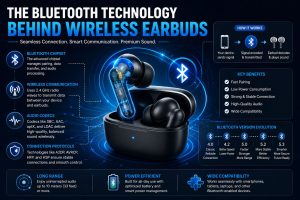
- Faster connections
- Lower battery consumption
- Greater stability
- Better audio quality
- Longer wireless range
Newer Bluetooth versions also reduce audio delay during gaming and video playback.
Bluetooth Audio Codecs Improve Sound Quality
An important part of how Bluetooth earbuds connect is the audio codec.
Audio codecs compress music before wireless transmission.
Common Bluetooth codecs include:
SBC
The standard codec supported by nearly every Bluetooth device.
AAC
Popular on Apple devices and offers improved audio quality.
aptX
Provides lower latency and better sound quality on supported Android devices.
LDAC
Designed for high-resolution wireless audio with excellent sound quality.
The codec your device uses depends on both the earbuds and the connected device.
Factors That Affect Bluetooth Earbuds Connection
Several factors influence Bluetooth earbuds connection quality.
Distance Between Devices
Most Bluetooth earbuds work best within 30 feet (10 meters).
Walls and furniture may reduce this range.
Battery Level
Low battery can weaken connection stability.
Keeping both devices charged improves performance.
Wireless Interference
Wi-Fi routers, microwaves, and other Bluetooth devices may occasionally interfere with wireless signals.
Software Updates
Manufacturers regularly release firmware updates that improve Bluetooth stability.
Keeping your earbuds updated ensures optimal performance.
Common Bluetooth Earbuds Connection Problems
Even premium earbuds sometimes experience connection issues.
Bluetooth Earbuds Won’t Pair
Possible causes include:
- Bluetooth disabled
- Pairing mode not activated
- Device memory full
- Software bugs
Restarting both devices often solves the problem.
Bluetooth Earbuds Keep Disconnecting
Frequent disconnections may occur because of:
- Low battery
- Distance
- Wireless interference
- Outdated firmware
Charging the earbuds and reducing interference usually helps.
Audio Delay
Some users notice audio lag while gaming or watching videos.
Low-latency Bluetooth codecs significantly reduce this issue.
Gaming earbuds often include dedicated low-latency modes.
Tips to Improve Bluetooth Earbuds Connectivity
If you want the best experience, follow these simple tips.
Keep Devices Updated
Install the latest firmware updates whenever available.
Manufacturers often improve Bluetooth performance through software updates.
Stay Within Bluetooth Range
For stable audio, keep your phone close to your earbuds.
Avoid placing thick walls or metal objects between connected devices.
Keep the Charging Case Clean
Dirty charging contacts may prevent earbuds from charging properly.
Clean them gently with a dry microfiber cloth.
Disconnect Unused Bluetooth Devices
Too many connected devices can sometimes create conflicts.
Disconnect devices you’re not actively using.
Restart When Necessary
Restarting both your earbuds and your smartphone often fixes temporary Bluetooth glitches.
Why Modern Bluetooth Earbuds Connect Faster
Today’s earbuds connect much faster than earlier wireless models.
Recent Bluetooth improvements include:
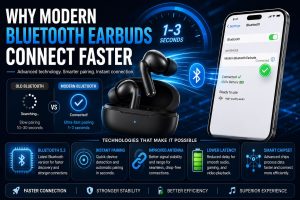
- Instant pairing
- Automatic reconnection
- Multipoint connectivity
- Lower power consumption
- Better signal stability
- Faster device recognition
Many premium earbuds now connect in just one or two seconds after opening the charging case.
Benefits of Bluetooth Earbuds
Understanding how Bluetooth earbuds connect helps you appreciate their many advantages.
Some of the biggest benefits include:
- Wireless freedom
- Quick pairing
- Automatic reconnection
- Better portability
- Comfortable everyday use
- Hands-free calling
- Voice assistant support
- Improved workout convenience
- High-quality wireless audio
These features make Bluetooth earbuds ideal for work, travel, fitness, and entertainment.
Frequently Asked Questions
How do Bluetooth earbuds connect to a phone?
Bluetooth earbuds connect by entering pairing mode. Your phone detects them through Bluetooth settings, and once paired, the devices automatically reconnect whenever Bluetooth is enabled.
Do Bluetooth earbuds work with laptops?
Yes. Most Windows laptops, MacBooks, Chromebooks, and tablets support Bluetooth earbuds if Bluetooth hardware is available.
Why won’t my Bluetooth earbuds connect?
Common reasons include disabled Bluetooth, low battery, outdated software, or the earbuds already being connected to another device.
How far can Bluetooth earbuds connect?
Most Bluetooth earbuds maintain a reliable connection within approximately 30 feet (10 meters) in open spaces.
Can Bluetooth earbuds connect to multiple devices?
Many modern earbuds support multipoint Bluetooth, allowing them to stay connected to two devices simultaneously and switch between them seamlessly.
Conclusion
Understanding how Bluetooth earbuds connect helps you appreciate the advanced wireless technology behind these compact devices. From secure pairing and Bluetooth communication to digital audio processing, microphones, and Active Noise Cancellation, every component works together to create a seamless listening experience.
Whether you’re exploring how wireless earbuds work, how do earbud headphones work, how earbud microphones work, or how noise cancelling earbuds work, you’ll find that today’s Bluetooth earbuds are designed to deliver convenience, high-quality sound, and reliable performance in almost every situation.
As Bluetooth technology continues to evolve, future earbuds will offer even faster connections, lower latency, smarter AI features, and better battery life-making wireless listening more enjoyable than ever.