
Table of Contents
ToggleIntroduction
Electronic devices have become an essential part of our daily lives. From smartphones and laptops to televisions, kitchen appliances, and smart home gadgets, we depend on electronics for work, communication, education, and entertainment. While these devices make life easier, improper use can lead to electrical shocks, fires, equipment damage, and even personal injury.
Following basic electronic safety tips helps protect both people and devices. Whether at home, in the office, or at school, practicing safe habits can extend the lifespan of electronics while reducing the risk of accidents.
This comprehensive guide covers the most important electronic safety practices, common hazards, and practical steps to ensure safe and responsible use of electronic devices.
Why Electronic Safety Is Important
Using electronics safely provides many benefits:
- Prevents electrical accidents
- Reduces fire hazards
- Protects valuable devices
- Extends equipment lifespan
- Prevents data loss
- Improves energy efficiency
- Creates a safer home and workplace
Ignoring safety precautions can result in costly repairs and serious injuries.
Keep Electronics Away from Water
Water is one of the biggest dangers to electronic devices.
Safety Tips
- Never use electronics with wet hands.
- Keep drinks away from computers and other devices.
- Avoid placing electronics near sinks or bathtubs.
- Protect outdoor electronics from rain unless they are specifically designed for outdoor use.
If a device becomes wet, disconnect it from power if it is safe to do so and allow it to dry before use.
Use Quality Chargers and Cables
Low-quality or damaged accessories may cause:
- Overheating
- Electrical failure
- Slow charging
- Fire hazards
Best Practices
- Use manufacturer-recommended or certified accessories.
- Replace damaged cables immediately.
- Avoid counterfeit charging products.
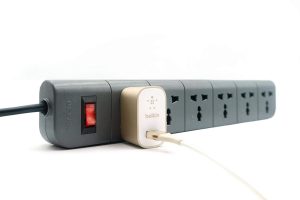
Do Not Overload Power Outlets
Plugging too many devices into one outlet increases the risk of overheating.
Instead:
- Use quality surge protectors.
- Distribute high-power devices across multiple outlets when appropriate.
- Follow the power ratings of extension cords and power strips.
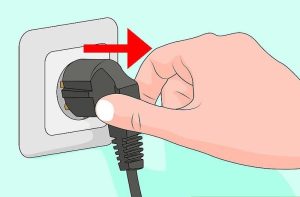
Unplug Devices Safely
When disconnecting electronics:
- Hold the plug, not the cable.
- Pull gently.
- Avoid twisting or yanking cords.
Pulling on the cable can damage both the wire and the connector.
Protect Devices from Overheating
Electronic devices generate heat during operation.
Prevent overheating by:
- Keeping ventilation openings clear.
- Using laptops on hard, flat surfaces.
- Cleaning dust from vents regularly.
- Avoiding direct sunlight.
- Not covering cooling fans.
Proper airflow helps maintain safe operating temperatures.
Keep Cables Organized
Loose or tangled cables can become damaged and create tripping hazards.
Tips
- Use cable organizers or ties.
- Keep cords away from walkways.
- Avoid sharply bending cables.
- Replace frayed cords promptly.
Install Software Updates
Safety is not only about hardware—it also includes cybersecurity.
Updates often provide:
- Security patches
- Bug fixes
- Performance improvements
- Protection against newly discovered threats
Keeping software current helps reduce digital risks.
Use Strong Passwords
Internet-connected electronics should be protected.
Choose passwords that:
- Are long and unique
- Combine letters, numbers, and symbols
- Are different for each important account
Where available, enable two-factor authentication for additional security.
Keep Electronics Away from Children
Some electronic devices contain:
- Small removable parts
- Batteries
- Sharp edges
- Power cords
To improve safety:
- Store devices out of reach when appropriate.
- Use child safety covers for unused outlets.
- Supervise young children around electronic equipment.
Protect Against Power Surges
Power surges caused by electrical faults or lightning can damage electronics.
Use:
- Surge protectors
- Uninterruptible Power Supplies (UPS) for important equipment
During severe storms, unplug valuable electronics if it is practical and safe to do so.
Avoid Using Damaged Devices
Do not continue using electronics that have:
- Cracked power adapters
- Exposed wires
- Burn marks
- Burning smells
- Loose plugs
These signs may indicate serious electrical problems requiring repair or replacement.
Charge Batteries Safely
Rechargeable batteries should be handled carefully.
Best Practices
- Use compatible chargers.
- Charge devices on stable surfaces.
- Avoid covering devices while charging.
- Disconnect chargers if they become excessively hot or show signs of damage.
Follow the manufacturer’s charging instructions for your specific device.
Clean Electronics Properly
Before cleaning:
- Turn off the device.
- Disconnect power when appropriate.
Use:
- Microfiber cloths
- Cleaning products designed for electronics
Avoid spraying liquids directly onto the device unless specifically recommended by the manufacturer.
Store Electronics Correctly
Proper storage helps maintain safety and performance.
Store devices:
- In cool, dry places
- Away from direct sunlight
- Away from excessive humidity
- In protective cases when transported
Dispose of Electronics Responsibly
Old electronics should not simply be thrown into regular household waste where prohibited.
Instead:
- Use authorized recycling programs.
- Follow local electronic waste regulations.
- Remove personal data from storage devices before disposal.
Responsible recycling helps protect the environment.
Common Electronic Safety Mistakes
Avoid these common errors:
- Using damaged charging cables
- Blocking ventilation openings
- Leaving liquids near electronics
- Overloading power strips
- Ignoring unusual smells or overheating
- Using electronics in unsafe environments
- Delaying replacement of damaged accessories
Small precautions can prevent major problems.
Electronic Safety Tips for Offices
Workplaces should:
- Inspect equipment regularly.
- Keep cables organized.
- Use surge protection.
- Maintain adequate ventilation.
- Train employees on safe equipment handling.
Good workplace practices reduce accidents and equipment failures.
Electronic Safety Tips for Schools
Schools should encourage students to:
- Handle devices carefully.
- Avoid food and drinks near electronics.
- Report damaged equipment.
- Use chargers correctly.
- Keep devices updated.
These habits promote safe learning environments.
Benefits of Following Electronic Safety Tips
Practicing electronic safety helps:
- Reduce accident risks
- Extend device lifespan
- Lower maintenance costs
- Improve reliability
- Protect valuable data
- Increase workplace and home safety
Safety benefits both users and equipment.
Frequently Asked Questions
Why is electronic safety important?
It helps prevent electrical shocks, fires, equipment damage, and data loss while extending the lifespan of devices.
Can overloaded outlets be dangerous?
Yes. Overloading outlets or power strips can increase heat buildup and create a fire hazard.
Should I unplug electronics during thunderstorms?
If it is safe and practical, unplugging valuable electronics or using surge protection can help reduce the risk of damage from power surges.
Is it safe to use a damaged charging cable?
No. Damaged cables should be replaced because they may present electrical and fire hazards.
How can I make my electronic devices safer?
Keep them clean, avoid water and excessive heat, use quality accessories, install updates, organize cables, and follow the manufacturer’s safety instructions.
Conclusion
Following these electronic safety tips is one of the best ways to protect yourself and your devices. Simple practices such as using quality chargers, avoiding overloaded outlets, keeping electronics away from water, ensuring proper ventilation, and maintaining updated software can significantly reduce risks and improve reliability.
By making electronic safety part of your daily routine, you can extend the life of your devices, prevent unnecessary repairs, and create a safer environment at home, school, and work.