
Introduction
Electronic devices are an essential part of modern life. From smartphones and laptops to televisions, gaming consoles, and smart home appliances, we rely on them every day for communication, work, education, and entertainment. However, even the best electronic devices can lose performance or fail early if they are not properly maintained.
Learning how to maintain electronics can help you extend the lifespan of your devices, improve their performance, reduce repair costs, and protect your valuable data. Fortunately, good maintenance does not require advanced technical knowledge—simple habits can make a significant difference.
This comprehensive guide explains the best practices for maintaining electronic devices, common mistakes to avoid, and practical tips for keeping your gadgets in excellent condition.
Why Electronics Maintenance Is Important
Regular maintenance offers many benefits:
- Extends device lifespan
- Improves performance
- Prevents overheating
- Reduces repair costs
- Protects important data
- Improves energy efficiency
- Keeps devices running safely
Neglecting maintenance can lead to hardware failures, battery problems, and slower performance.
Keep Electronic Devices Clean
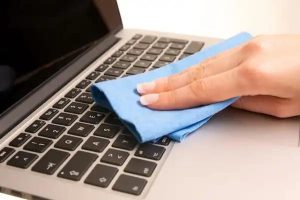
Dust and dirt can block ventilation and interfere with normal operation.
Cleaning Tips
- Use a soft microfiber cloth.
- Remove dust regularly.
- Clean screens with products designed for electronics.
- Avoid excessive moisture.
- Use compressed air for keyboards and vents when appropriate.
Never spray liquid directly onto the device.
Protect Devices from Heat
Heat is one of the biggest enemies of electronics.
High temperatures can:
- Reduce battery life
- Slow performance
- Damage internal components
- Shorten overall lifespan
Best Practices
- Keep devices away from direct sunlight.
- Avoid leaving electronics inside hot cars.
- Ensure proper ventilation around laptops and desktops.
- Do not block cooling vents.
Keep Electronics Away from Water
Water and electronics rarely mix.
Avoid:
- Using devices with wet hands
- Placing drinks near electronics
- Operating devices in heavy rain unless designed for it
- Storing electronics in damp environments
If a device gets wet, disconnect power (if safe to do so) and allow it to dry before attempting to use it. Severe liquid exposure may require professional inspection.
Update Software Regularly
Software updates often include:
- Security improvements
- Bug fixes
- Performance enhancements
- Compatibility updates
Enable automatic updates when appropriate and install updates from trusted sources.
Use Quality Chargers and Accessories
Using low-quality chargers or cables may cause:
- Slow charging
- Battery damage
- Overheating
- Electrical instability
Whenever possible:
- Use manufacturer-approved accessories.
- Replace damaged cables promptly.
- Avoid counterfeit charging products.
Protect Against Power Surges
Sudden voltage spikes can damage electronics.
Use:
- Surge protectors
- Quality power strips with surge protection
- Uninterruptible Power Supplies (UPS) for important computers
These devices help protect equipment from electrical fluctuations.
Manage Battery Health
Rechargeable batteries gradually wear over time.
Good Habits
- Avoid exposing batteries to extreme heat.
- Use compatible chargers.
- Recharge when needed instead of allowing long periods of deep discharge if the manufacturer advises otherwise.
- Replace batteries when performance significantly declines.
Battery care recommendations can vary by device manufacturer, so consult your user manual.
Keep Storage Organized
A device with nearly full storage may experience slower performance.
Regularly:
- Delete unnecessary files.
- Remove unused applications.
- Clear temporary files when appropriate.
- Organize important documents.
Adequate free storage helps many devices operate more efficiently.
Back Up Important Data
Hardware failures can occur unexpectedly.
Maintain backups by using:
- External hard drives
- Cloud storage
- Network storage systems
Regular backups protect valuable photos, documents, and work files.
Avoid Physical Damage
Many electronic failures result from accidental impacts.
Protect devices by:
- Using protective cases
- Applying screen protectors where appropriate
- Carrying laptops in padded bags
- Keeping devices away from edges where they could fall
Careful handling reduces repair costs.
Keep Air Vents Clear
Computers, gaming consoles, and some other electronics require airflow.
Do not:
- Cover ventilation openings
- Place laptops on soft bedding that blocks airflow
- Store devices in enclosed spaces while operating
Proper ventilation helps maintain safe operating temperatures.
Disconnect During Severe Electrical Storms
Lightning and power fluctuations can damage sensitive electronics.
If practical and safe:
- Unplug valuable equipment during severe storms.
- Use surge protection for devices that remain connected.
Maintain Network Security
Internet-connected devices should be protected.
Best Practices
- Use strong passwords.
- Keep firmware updated.
- Enable two-factor authentication where available.
- Secure your home Wi-Fi network.
Good cybersecurity is part of electronic device maintenance.
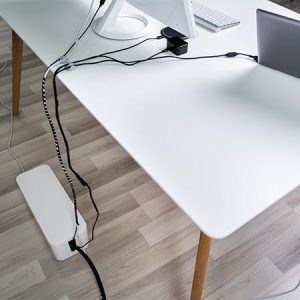
Organize Cables Properly
Messy cables can become damaged or create safety hazards.
Tips:
- Use cable organizers or ties.
- Avoid tightly bending cables.
- Keep cords away from sharp edges.
- Replace frayed cables immediately.
Clean Keyboards and Screens Carefully
For keyboards:
- Turn off the device first.
- Remove loose debris gently.
- Use compressed air if appropriate.
For screens:
- Use a microfiber cloth.
- Apply screen cleaner to the cloth rather than directly onto the display unless the manufacturer instructs otherwise.
Store Electronics Properly
If storing devices for an extended period:
- Keep them in a cool, dry place.
- Protect them from dust.
- Avoid direct sunlight.
- Use protective covers when appropriate.
Proper storage helps preserve both hardware and batteries.
Common Mistakes to Avoid
Avoid these habits:
- Blocking cooling vents
- Ignoring software updates
- Using damaged charging cables
- Overloading power outlets
- Dropping or mishandling devices
- Exposing electronics to moisture
- Skipping data backups
Preventive care is usually easier and less expensive than repairs.
Benefits of Regular Electronics Maintenance
Proper maintenance can provide:
- Longer device lifespan
- Better performance
- Improved reliability
- Lower repair costs
- Greater energy efficiency
- Better protection for important data
A few minutes of maintenance each month can significantly improve long-term performance.
Frequently Asked Questions
How often should I clean electronic devices?
Light cleaning every week and a more thorough inspection every few months is a practical schedule for many devices, depending on the environment.
Can heat damage electronics?
Yes. Excessive heat can shorten battery life, reduce performance, and damage internal components.
Is it safe to use third-party chargers?
It is generally safest to use chargers and accessories that meet the manufacturer’s specifications and come from reputable brands.
Why are software updates important?
They often improve security, fix bugs, and enhance performance and compatibility.
How can I make my electronics last longer?
Keep them clean, avoid extreme temperatures and moisture, use quality accessories, install updates, protect them from power surges, and handle them carefully.
Conclusion
Knowing how to maintain electronics is essential for getting the best performance and longest lifespan from your devices. Simple habits such as regular cleaning, protecting equipment from heat and moisture, using quality chargers, installing software updates, organizing storage, and backing up data can prevent many common problems.
By investing a small amount of time in routine maintenance, you can reduce repair costs, improve reliability, and keep your electronic devices working efficiently for years to come.