
Wireless earbuds have become part of everyday life. Whether you’re listening to your favorite playlist during a morning walk, attending Zoom meetings, watching Netflix late at night, or taking calls on the go, earbuds offer convenience that wired headphones simply can’t match.
But if you’ve ever spent 20 minutes trying to connect a new pair, wondered why only one earbud works, or worried about ear infections after long listening sessions, you’re not alone.
This guide answers the most common questions users have about wireless earbuds—from pairing and troubleshooting to cleaning, safety, and understanding how the technology actually works.
Table of Contents
ToggleWhy Wireless Earbuds Are So Popular Today
A decade ago, most people relied on wired earphones. Today, wireless earbuds dominate the market because they are:
- Portable and lightweight
- Easy to carry
- Convenient for workouts
- Compatible with most devices
- Equipped with advanced features like noise cancellation and voice assistants
However, getting the best experience requires understanding how to use and maintain them properly.
How to Use Wireless Earbuds Properly for Best Experience
Many users buy earbuds and immediately start using them without learning the basics. While wireless earbuds are designed to be user-friendly, a few simple habits can dramatically improve your experience.
Step 1: How to Charge Wireless Earbuds Before First Use
Most manufacturers recommend fully charging both earbuds and the charging case before using them for the first time.
A complete initial charge helps ensure optimal battery performance.
Step 2: Choosing the Right Ear Tips for Wireless Earbuds
This is something many people overlook.
A proper fit:
- Improves sound quality
- Makes earbuds more comfortable
- Enhances noise isolation
- Prevents earbuds from falling out
Try different ear tip sizes if your earbuds include them.
Step 3: Learning Controls of Wireless Earbuds for Easy Use
Modern earbuds often support:
- Play/Pause
- Skip tracks
- Answer calls
- Activate voice assistants
- Adjust noise cancellation settings
Taking a few minutes to learn the controls can save frustration later.
How to Pair Wireless Earbuds with Android and iPhone 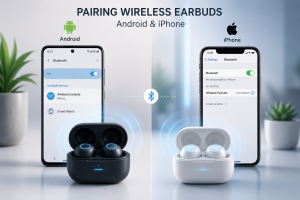
Pairing wireless earbuds is usually a simple process, but it’s also one of the most common areas where users encounter problems.
Pairing with Android
- Open Bluetooth settings.
- Enable Bluetooth.
- Put your earbuds into pairing mode.
- Select the earbuds from the available device list.
- Confirm the connection.
Pairing with iPhone
- Open Settings.
- Tap Bluetooth.
- Turn Bluetooth on.
- Place earbuds in pairing mode.
- Tap the device name when it appears.
Tips for Faster Wireless Earbuds Pairing
- Keep earbuds close to your device.
- Ensure batteries are sufficiently charged.
- Disconnect from previously connected devices.
- Restart Bluetooth if necessary.
Once paired, most earbuds reconnect automatically whenever you open the charging case.
One Wireless Earbuds Not Working? Causes and Fixes
Few things are more annoying than putting in your earbuds and discovering that only one side works.
Fortunately, this doesn’t always mean your earbuds are broken.
Common Causes of Wireless Earbuds One Side Not Working
Battery Imbalance
Sometimes one earbud drains faster than the other.
How to Reset Wireless Earbuds for Better Sync
The left and right earbuds communicate with each other. Occasionally this connection gets disrupted.
Dirt and Earwax Buildup
A blocked speaker grille can make an earbud seem dead even though it still works.
Software Glitches
Temporary firmware issues may prevent one side from functioning correctly.
How to Clean Wireless Earbuds and Remove Earwax Safely
Recharge Everything
Place both earbuds inside the charging case for at least 30 minutes.
Reconnect the Device
Forget the earbuds from Bluetooth settings and pair them again.
Reset the Earbuds
Many brands offer a factory reset function.
Clean the Speaker Mesh
Even a thin layer of earwax can significantly reduce sound output.
Update Firmware
Check the manufacturer’s app for updates.
In many cases, one of these solutions resolves the problem within minutes.
How to Clean Earwax from Earbuds Safely
Let’s be honest—almost nobody cleans their earbuds as often as they should.
Yet earwax is one of the biggest reasons earbuds lose sound quality over time.
Regular cleaning doesn’t just improve audio performance. It also helps protect your ears from bacteria buildup.
Tools Needed to Clean Wireless Earbuds Safely
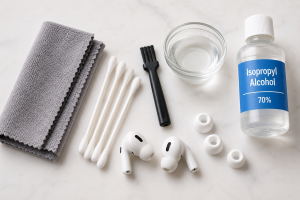
- Microfiber cloth
- Cotton swabs
- Soft-bristled brush
- Mild soap
- Optional: Isopropyl alcohol
Cleaning Process
Remove the Ear Tips
Take off silicone tips and clean them separately.
Brush Away Earwax
Use a soft brush to gently remove buildup around the speaker grille.
Wipe Exterior Surfaces
Use a dry microfiber cloth to remove dirt and oils.
Wash Silicone Tips
Clean with warm water and mild soap.
Allow Everything to Dry
Never reassemble earbuds while they’re still wet.
Cleaning Mistakes to Avoid
Avoid using:
- Needles
- Toothpicks
- Sharp metal tools
- Excessive moisture
- Strong cleaning chemicals
These can permanently damage delicate components.
Can Wireless Earbuds Cause Ear Infections?
This is one of the most searched earbud-related health questions.
The short answer is: yes, under certain conditions.
However, earbuds themselves don’t directly cause infections.
The issue usually comes from poor hygiene and prolonged use.
Why Ear Infections Can Happen
Dirty Earbuds
Earbuds accumulate:
- Earwax
- Sweat
- Skin oils
- Bacteria
Over time, these contaminants can enter the ear canal.
Moisture Build-Up
Long listening sessions can trap moisture inside the ear.
Warm, moist environments encourage bacterial growth.
Sharing Earbuds
Sharing earbuds can transfer germs between people.
Wearing Earbuds Too Long
Extended use can irritate sensitive skin inside the ear canal.
How to Reduce the Risk
- Clean earbuds regularly.
- Avoid sharing them.
- Remove earbuds periodically throughout the day.
- Let your ears breathe.
- Replace worn-out ear tips.
Good hygiene habits significantly reduce the risk of ear problems.
How Do Wireless Earbuds Work Using Bluetooth Technology?
Wireless earbuds seem almost magical.
No wires.
No physical connection.
Yet music streams seamlessly from your phone to your ears.
The secret is Bluetooth technology.
Bluetooth Communication
When you play a song:
- Your phone converts audio into digital signals.
- Bluetooth transmits those signals wirelessly.
- Earbud processors receive the data.
- Drivers convert the signal into sound waves.
This process happens almost instantly.
How Wireless Earbuds Use Bluetooth Technology
Handles wireless communication.
Battery
Provides power to all internal components.
Driver Unit
Produces sound.
Microphone
Captures your voice during calls.
Sensors
Detect when earbuds are worn or removed.
Together, these components create the seamless experience users enjoy every day.
How Do Noise Cancelling Earbuds Work?
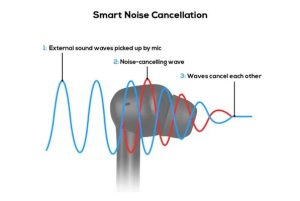
If you’ve ever worn premium earbuds on an airplane, you’ve probably noticed how dramatically they reduce background noise.
This is thanks to Active Noise Cancellation (ANC).
Passive Noise Isolation in Wireless Earbuds Explained
The first layer of noise reduction is physical.
When silicone ear tips create a tight seal, they block a portion of external noise naturally.
This is called passive noise isolation.
Active Noise Cancellation (ANC)
ANC takes things a step further.
Tiny microphones continuously listen to surrounding sounds.
The earbud processor then creates an opposite sound wave.
When the two sound waves meet, much of the unwanted noise is cancelled out before reaching your ears.
Sounds ANC Handles Best
Noise cancellation works especially well against:
- Airplane engines
- Train noise
- Air conditioning systems
- Traffic hum
- Office background sounds
Sudden noises, such as shouting or a dog barking, are often harder to eliminate completely.
Benefits of Wireless Noise Cancelling Earbuds
Better Focus
Perfect for studying or working.
Improved Travel Experience
Makes flights and commutes more comfortable.
Lower Listening Volumes
Since background noise is reduced, users often listen at safer volume levels.
Enhanced Audio Quality
Music sounds clearer and more detailed.
Tips to Make Your Wireless Earbuds Last Longer
Wireless earbuds aren’t cheap, so it’s worth taking care of them.
Store Them in the Case
Leaving earbuds loose in bags or pockets increases the risk of damage.
Avoid Extreme Temperatures
Heat and cold can shorten battery life.
Keep Them Clean
Routine maintenance prevents many common issues.
Update Firmware
Software updates often improve performance and connectivity.
Use Safe Volume Levels
Listening at maximum volume for extended periods can harm your hearing.
Many hearing experts recommend the 60/60 rule:
- No more than 60% volume
- No more than 60 minutes at a time
Final Thoughts
Wireless earbuds have changed how we listen to music, communicate, and consume content. Understanding how to use wireless earbuds, how to pair wireless earbuds, and what to do when one earbud is not working can save you hours of frustration.
At the same time, learning how to clean earwax from earbuds, understanding whether earbuds can cause ear infections, and knowing how wireless earbuds and noise cancelling earbuds work helps you get the most value from your investment.
The best earbuds aren’t just the most expensive ones—they’re the ones you use correctly, maintain regularly, and wear safely.
Frequently Asked Questions (FAQ)
How often should I clean my earbuds?
Ideally, clean them once every one to two weeks. If you use them daily or during workouts, clean them more frequently.
Why is only one of my wireless earbuds working?
The most common causes include low battery, Bluetooth synchronization issues, earwax blockage, outdated firmware, or hardware problems.
Can dirty earbuds affect sound quality?
Yes. Earwax and debris can block the speaker mesh, resulting in muffled or quieter sound.
Is it safe to wear earbuds every day?
Yes, provided you maintain moderate volume levels, clean them regularly, and give your ears occasional breaks.
Can earbuds permanently damage hearing?
Listening at excessively high volumes for long periods can contribute to hearing loss over time.
Do noise-cancelling earbuds protect hearing?
They can help because users often listen at lower volumes when background noise is reduced.
Why won’t my earbuds pair with my phone?
Common reasons include low battery, Bluetooth interference, pairing mode issues, or a previously saved connection conflict.
How long do wireless earbuds typically last?
Most quality wireless earbuds last between 2–5 years, depending on battery health, usage habits, and maintenance.
Should I sleep with earbuds in?
Occasional use may be fine, but sleeping with earbuds regularly can increase moisture buildup and irritation inside the ear canal.
Are wireless earbuds better than wired earphones?
Wireless earbuds offer greater convenience and mobility, while wired earphones may provide unlimited listening without battery concerns. The best choice depends on your personal needs and preferences.