
Wireless earbuds are convenient, compact, and perfect for daily use, but they are not flawless. One of the most frustrating issues users face is when one earbud not working while the other continues playing normally. It can happen suddenly—during music, calls, or videos—and often leaves users confused about whether the device is broken or if it’s just a minor glitch.
In most cases, the problem is not permanent. It usually comes from connectivity errors, uneven battery levels, dirt buildup, or simple settings issues. The good news is that you can often fix it at home without replacing your earbuds. Understanding the root cause is the first step toward solving the issue quickly and restoring balanced sound in both ears.
Table of Contents
ToggleOne Earbud Not Working – Common Causes
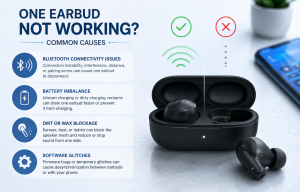
When a single earbud stops working, it usually points to one of a few common problems. Let’s break them down clearly.
Bluetooth connectivity issues
Bluetooth connection instability is one of the top reasons behind a single earbud failure. Sometimes, one earbud disconnects from the phone while the other stays connected. This can happen due to signal interference, distance from the device, or pairing errors between the left and right earbuds themselves.
If the earbuds are not properly synced with each other, only one side may receive audio data.
Battery imbalance
Another frequent cause is uneven charging. Many users unknowingly use one earbud more than the other, causing a battery imbalance. In some cases, one earbud may not charge properly due to dirt on the charging contacts or a faulty charging case connection.
When one side runs out of battery earlier than the other, it appears as if only one earbud is working.
Dirt or wax blockage
Earbuds sit directly in the ear, which makes them prone to earwax, dust, and debris buildup. Over time, this can block the speaker mesh and reduce or completely stop sound from coming out of one side.
Even a thin layer of dirt can significantly reduce audio output.
Software glitches
Modern earbuds rely on firmware and software processing. Temporary glitches can cause desynchronization between earbuds or between the earbuds and your phone. This is especially common after updates or long usage without restarting the devices.
How to Fix It
Now that we understand the causes, let’s look at practical solutions you can try step by step.
One Earbud Not Working – Restart and reset earbuds
A simple restart can solve many temporary issues. Place both earbuds back into the charging case, close the lid, and wait for about 10–15 seconds before taking them out again.
If the problem continues, perform a full reset. Most earbuds have a reset function by holding the touch sensors or buttons for a few seconds until the indicator light flashes. This restores factory settings and often fixes syncing problems.
One Earbud Not Working – Re-pair with your device
Sometimes the Bluetooth pairing itself becomes corrupted. Go to your phone’s Bluetooth settings, forget the earbuds, and remove them from the paired device list.
Then put the earbuds back into pairing mode and connect them again. This fresh connection often resolves single-ear audio issues immediately.
One Earbud Not Working – Clean earbuds properly
Cleaning is often overlooked but extremely important. Use a soft, dry cloth or a clean toothbrush to gently remove dirt from the speaker mesh. Avoid using water or sharp objects, as they can damage internal components.
If earwax is blocking sound, careful cleaning can restore full audio output in seconds.
One Earbud Not Working – Check audio balance settings
Your phone settings might be the hidden reason behind the issue. Both Android and iPhone devices allow users to adjust left-right audio balance. If the balance is shifted to one side, it may sound like one earbud is not working.
Check accessibility or sound settings and ensure the audio balance is centered.
One Earbud Not Working – Update firmware
Some earbuds come with companion apps that provide firmware updates. Outdated software can cause connection bugs and performance issues. Updating to the latest version can improve stability and fix known glitches.
One Earbud Not Working – Device Specific Solutions
Different devices can also influence how earbuds behave. Here are some tailored fixes depending on your phone type.
Android fixes
On Android devices, Bluetooth settings can sometimes cache old connection data. If resetting the earbuds does not work, try clearing Bluetooth cache from system settings or restarting the phone.
Also ensure that no audio enhancement apps are interfering with sound output.
iPhone fixes
For iPhone users, go to Bluetooth settings and forget the device, then reconnect it. If the issue continues, resetting network settings can help clear hidden configuration problems affecting audio routing.
Also make sure iOS is updated, as older versions may have Bluetooth bugs.
How to Prevent It in the Future
Prevention is always better than repeated troubleshooting. A few simple habits can reduce the chances of facing this issue again.
Keep your earbuds clean and store them properly in the charging case when not in use. Avoid exposing them to moisture or extreme heat. Make sure both earbuds are charged evenly, and occasionally reset them to maintain proper synchronization.
Also, try not to use only one earbud constantly, as this can create battery imbalance over time.
Conclusion
Experiencing one earbud not working can be annoying, especially when you rely on earbuds for music, calls, or workouts. However, in most cases, the issue is not serious and can be fixed with simple steps like resetting, cleaning, re-pairing, or adjusting settings.
By understanding the common causes and applying the right solutions, you can quickly restore balanced audio and extend the life of your earbuds. Regular care and proper usage habits will also help you avoid this problem in the future, ensuring a smooth and uninterrupted listening experience.